Appearance workspace integration
The integrated image Appearance dock connects the existing model, renderer, history and export services. It is the shared foundation for the image/PDF/reference/capture roadmap; acceptance of one slice does not establish the later adapters.
Workflow
Open Author → Appearance, the activity rail, or the Appearance command in the command palette. Choose a target model, upload a PNG/JPEG, and select the model, selected objects, exact IFC class or exact type. Types with identical names remain separate by their entity identity. Federation selections resolve through the store, including the zero-offset single-model case.
Existing UVs retain the source layout. Planar and box projection use physical metres in the IFC world frame. Alignment controls set rotation and offsets; invalid numeric input disables Apply rather than submitting an earlier value. Changes regenerate a cancellable preview. Compare restores the original GPU appearance; Discard cancels pending work and restores the committed model.
Closing the panel releases its worker and draft GPU resources while retaining the logical source/scope/mapping settings. Reopening regenerates the same draft; a discarded draft stays inactive. Missing sources or models do not silently resume a different draft. Upload ownership survives duplicate uploads and publication failures without leaking provisional object URLs or image leases.
Apply uses the existing compound appearance command and Undo/Redo stack. Normal IFC export uses the compact effective snapshot and packages retained images as IFCZIP. The export dialog reports IFC + images when resources are present. Appearance editing in an active room remains unavailable until collaborative compound authoring is supported; users can share a completed model for viewing.
Acceptance and limitations
The real WebGPU viewer has exercised the initially untextured IFCOpenShell wall and public Convento model through preview, Apply, Undo/Redo, normal IFCZIP export/reopen and selection. Convento model-wide application covers 20 owners and 115 geometry parts; a second federated model retains its original geometry and appearance. See the recorded preview.
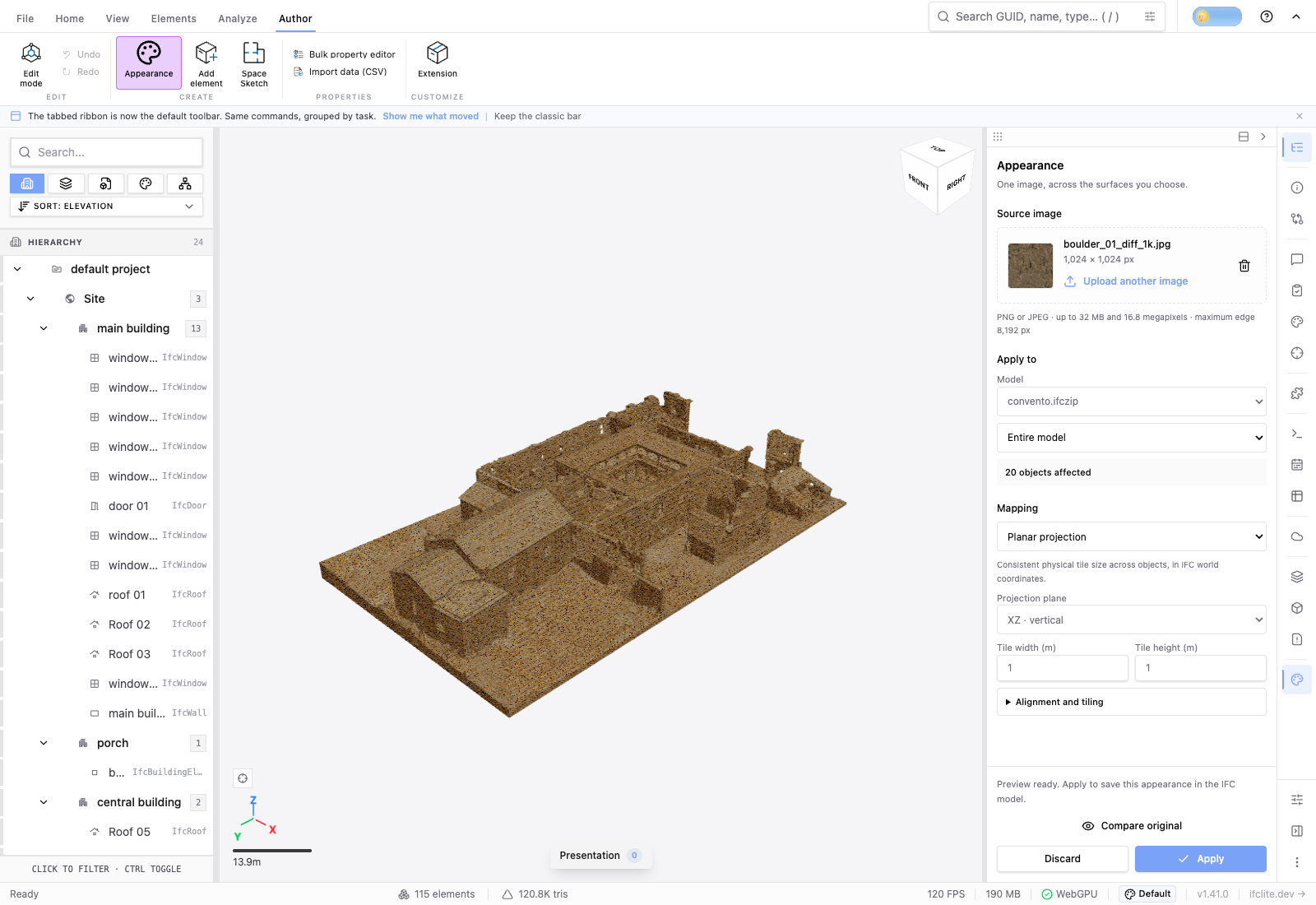
Mounted tests cover cancellation during debounce/worker work, stale revisions, source ownership failures, duplicate uploads, draft restoration and toolbar entry points. Scope tests cover federation, exact type identity and deleted owners.
Scope metadata comes from the canonical Rust catalog over the effective IFC snapshot. The catalog and preview share the same validated bytes; direct SDK edits invalidate cached scopes even without a viewer revision increment. Tests cover retyping, stale catalog responses and cancellation without allocator or history changes.
The trusted-input acceptance completes #4336: cooperative preparation lets input and Discard run during Apply, with unchanged geometry/history behavior. The final synchronous transaction fence still pauses rendering; this is not a claim of uninterrupted frame delivery.
Fresh-room and IFCX acceptance completes #4325. The authored Convento model survives normal Share, fresh join, fresh rejoin, room export, ordinary IFCX import and viewport picking with matched owner/triangle/UV/image associations. Room transport preserves decoded image pixels; it does not promise the original compressed image bytes.
This completes the scoped direct-tessellated image workflow in #4243. Evaluated surfaces and mapped occurrences remain in #4404; coordinated multi-model assignment and history remain in #4420. The scoped image workflow does not imply those later capabilities are available.